Integrator guide
Before you build
About this guide
This is a technical guide for connecting physical battery systems to the Tensor Cloud battery optimization service. It is aimed at:
- System integrators implementing battery optimization solutions
- EMS developers building gateway connections to Tensor Cloud
- Technical stakeholders responsible for energy storage system operations
Use this guide together with the communication protocol specification in AsyncAPI format. This guide covers the integration process, technical requirements, and operational responsibilities. The specification defines the message schemas, telemetry requirements, and command structures.
We recommend reading the AsyncAPI specification before starting the integration. It documents the communication protocol and explains how to generate client code.
Before building an integration with Tensor Cloud, make sure you contact our technical team for detailed guidance and for getting access to a Tensor Cloud development workspace.
Terminology
| Term | Meaning |
|---|---|
| EMS | Energy Management System: the on-site controller that reads telemetry and executes battery commands. |
| TSO | Transmission System Operator: the regional grid operator (e.g. TEPCO PG, Chubu). |
| OCCTO | Organization for Cross-regional Coordination of Transmission Operators: Japan's nationwide grid coordinator. |
| JEPX | Japan Electric Power Exchange: the wholesale electricity spot market. |
| FIT / FIP | Feed-in Tariff / Feed-in Premium: Japan's renewable-energy support schemes. |
| FCR | Frequency Containment Reserve (一次調整力): a primary frequency-regulation ancillary service. |
| SoC / SoE | State of Charge (%) / State of Energy (kWh) of the battery. |
| SoH | State of Health: remaining battery capacity relative to when new. |
| VPP | Virtual Power Plant: several resources aggregated into a single market resource. |
| BMS | Battery Management System: the battery's own control and monitoring unit. |
| Assessment II | The TSO's after-the-fact evaluation of delivered FCR response, computed from 1-second data. |
How Tensor Cloud works
The battery optimization API connects Tensor Cloud's optimization engine to an on-site Energy Management System (EMS). Tensor Cloud combines technical signals from the battery and other site hardware with electricity-market and other economic data to create economically optimal charge and discharge schedules.
The EMS controls the battery and collects site telemetry. Tensor Energy works with established integration partners, but any EMS vendor can connect by implementing this MQTT protocol.
System overview
Tensor Cloud currently supports one battery, one solar system, and one electrical load per site.
Battery system topologies
Tensor Cloud supports three battery system topologies: AC-linked, DC-linked, and stand-alone.
Telemetry requirements vary by topology. See the telemetry section for details.
AC-linked battery systems
AC-linked systems are common in retrofit FIP-conversion projects where changing the original solar topology would invalidate FIT/FIP certification. The battery and solar system exchange energy through separate inverters. An optional on-site electrical load can also connect via AC.
DC-linked battery systems
In DC-linked systems, the battery and solar PV share a DC connection, which can transfer energy more efficiently. These systems are common in new installations designed to include battery storage. They may also include an on-site electrical load.
Stand-alone battery systems
Stand-alone battery systems have no co-located solar generation or electrical load. They often operate as merchant systems that participate only in energy markets.
Roles and responsibilities
Tensor Cloud, its integration partners, and the battery system owner share responsibility for integrating and operating the battery optimization service.
| Party | Responsibilities |
|---|---|
| Tensor Energy | • Economic optimization and schedule generation • Soft guarantees of battery system owner preferences (e.g., min/max SoE) |
| Integrator/EMS | • EMS uptime management and guarantees in alignment with battery owner • Accurate telemetry reading from site hardware according to the protocol specifications • Local enforcement of TSO constraints (e.g., battery ramp rates, curtailment, data logging requirements) • Hard guarantees of battery system owner preferences (e.g., min/max SoE) • Emergency response and EMS hardware fault handling |
| Battery system owner | • Imbalance responsibility (depending on contract terms, this could be shared with Tensor Energy) • Relationship management with TSO and other stakeholders like OCCTO (depending on contract terms, this could be shared with Tensor Energy) |
| Battery OEM | • Hardware maintenance and support (depending on contract terms with battery system owner) • Battery firmware updates and bug fixes |
Connect to Tensor Cloud
Communication
Tensor Cloud uses MQTT (Message Queuing Telemetry Transport) 3.1.1 over TLS 1.2+ for pub/sub communication with the EMS.
Endpoints
Use the following MQTT broker endpoints:
Testing environment: mqtt.staging.tensorenergy.jp:8883
Production environment: mqtt.tensorenergy.jp:8883
Use the testing environment during development and for post-integration testing. Move to the production environment for live operations after the integration has been validated.
Authentication
Tensor Cloud uses X.509 certificates for secure authentication with our MQTT broker. Each EMS gateway or software application must have its own unique certificate. Your technical contact at Tensor Energy will provide certificates for development and production environments on request within 24 hours.
Each certificate can publish and subscribe only to its authorized MQTT topics, restricting the EMS to data and commands for its site.
Certificates issued by Tensor do not expire and do not require periodic rotation by default. Integrators or their customers who require regular rotation can request it from the Tensor technical team.
Each certificate may be used by only one concurrent MQTT connection. This is enforced by AWS IoT Core: when a second connection is opened with the same certificate, the older session is disconnected.
Quality of service (QoS)
Tensor Cloud supports MQTT QoS levels 0 and 1 for message delivery. Under QoS 0 messages are delivered at most once; under QoS 1 at least once. With QoS 1 the broker handles message delivery acknowledgement at the MQTT transport layer; no additional broker-level ack messages are required from your client.
This is separate from the application-level acknowledgements your EMS sends on its res_topic (typically ack-cmd/{siteId}) for every command it receives (see Command lifecycle). Those are required regardless of QoS because they carry validation results, not delivery confirmation.
Always publish batch topics at QoS 1, never QoS 0. A batch carries up to 900 readings, and QoS 0 gives the client no indication that a lost batch must be resent. Also publish batches with the MQTT RETAIN flag unset. Otherwise, the broker replays a retained batch to each new subscriber as fresh telemetry.
A PUBACK confirms that the broker received the message. It does not confirm ingestion by Tensor Cloud.
MQTT topics
The EMS and Tensor Cloud communicate through hierarchical MQTT topics based on site and device identifiers.
Site and gateway IDs
Understanding the relationship
- Site ID (
siteId): Represents a single physical installation location (e.g., one battery storage facility). This identifier is used for command topics since commands are sent to the site level. - Gateway ID (
gatewayId): Represents a specific EMS device or software instance that collects telemetry and executes commands for a site. This identifier is used in telemetry topics to distinguish which gateway device is reporting.
Common configurations
-
Single gateway per site (typical): One physical EMS device installed at the site
- Example: Site
si_qcf9gnhas gatewaygw_0uv3tf - All telemetry from this site uses
dt/si_qcf9gn/gw_0uv3tf/... - Commands are sent to
cmd/si_qcf9gn/...
- Example: Site
-
Hot standby: Both primary and standby devices are connected to the MQTT broker
- Example: Site
si_qcf9gnhas gatewaysgw_0uv3tf(primary) andgw_dwj4n2(standby) - Both devices subscribe to
cmd/si_qcf9gn/... - Only the active gateway publishes telemetry, acknowledges commands, and executes schedules. The standby gateway receives commands but does not ack or execute until it is promoted to active. This avoids duplicate
ack-cmdmessages and double-execution of schedules. Primary/standby coordination is the EMS partner's responsibility. - On failure, standby takes over and starts publishing telemetry, acks, and executing schedules using
dt/si_qcf9gn/gw_dwj4n2/.../ack-cmd/si_qcf9gn. - Each gateway has its own unique certificate
- Example: Site
-
Cold standby: Only the primary device is connected to the MQTT broker
- Example: Site
si_qcf9gnhas gatewaysgw_0uv3tf(primary) andgw_dwj4n2(standby) - Primary publishes telemetry using
dt/si_qcf9gn/gw_0uv3tf/... - Standby device is physically on site but NOT connected to the broker
- On primary failure, standby connects and publishes using
dt/si_qcf9gn/gw_dwj4n2/... - Each gateway has its own unique certificate
- Example: Site
Important notes
- Each certificate can publish/subscribe to topics for only the sites it is authorized for
- For redundancy setups, each physical gateway device must have its own certificate
- One certificate can only be used for one concurrent connection to the broker
Topic overview
The diagram below shows the core telemetry and command flows. The alert (.../alert, .../alert/active), irradiation, and 1 Hz frequency topics are described in their respective sections.
Message format
All MQTT payloads use JSON. The protocol schema defines telemetry and command messages, including their required fields, data types, and validation rules.
Message envelope essentials
message_id: every message carries a uniquemessage_idof the formmsg_<uuid>, amsg_prefix followed by a lowercase UUIDv4, matching^msg_[0-9a-f]{8}-[0-9a-f]{4}-[0-9a-f]{4}-[0-9a-f]{4}-[0-9a-f]{12}$. When resending a sample, reuse its originalmessage_idso Tensor Cloud can deduplicate.schema_version: every message includes the protocol version it was produced under (currently2.9.0).- Timezone: every
*_tsfield is an ISO-8601 timestamp with an explicit offset. Tensor Cloud operates in Japan Standard Time (+09:00); use it for all timestamps and avoid a bareZ. {window}token: in windowed energy topics (.../energy/{window}),{window}is an ISO-8601 duration and must be one ofPT1M,PT5M,PT10M,PT15M,PT30M,PT1H.- Forward compatibility: messages may carry fields introduced by newer schema revisions (
additionalProperties: true). Parse the fields you know and ignore unknown ones rather than rejecting the message.
Timestamp boundary convention
All time windows in the protocol use left-inclusive, right-exclusive boundaries: [start_ts, end_ts)
This convention applies to:
- Windowed energy telemetry (
measurement_value.start_tsandmeasurement_value.end_ts) - Curtailment schedules (
start_tsandend_ts) - Battery power command schedules (
control.schedule[].start_tsandcontrol.schedule[].end_ts) - FCR offer command schedules (
control.schedule[].start_tsandcontrol.schedule[].end_ts)
Example: A time window with end_ts of 2024-01-04T10:30:00.000+09:00 includes all times up to but not including 10:30:00. This means it includes 10:29:59.999... but not 10:30:00.000.
Adjacent time windows therefore meet without gaps or overlaps:
- Window 1:
[10:00:00, 10:30:00)→ includes 10:00:00, excludes 10:30:00 - Window 2:
[10:30:00, 11:00:00)→ includes 10:30:00, excludes 11:00:00
measurement_ts on windowed measurements
On any measurement that covers a period of time, measurement_ts always carries the start of that period, never its end or midpoint.
This applies only to windowed measurements:
- Windowed energy telemetry (
.../energy/{window}):measurement_tsequalsmeasurement_value.start_ts - Instantaneous power telemetry sent with
aggregation: "average":measurement_tsis the start ofaggregation_window - Grid frequency telemetry sent with
aggregation: "average":measurement_tsis the start ofaggregation_window
For point-in-time telemetry (lifetime counters, power sent with aggregation: "instant", irradiation, solar DC voltage and current, battery state, alerts), measurement_ts is simply the instant the value was measured, and there is no period to align to.
Example: a 30-minute energy reading covering [10:00:00, 10:30:00) has measurement_ts of 2024-01-04T10:00:00.000+09:00. Publishing 10:30:00 instead shifts the reading into the following window.
Curtailment schedules (dt/{siteId}/{gatewayId}/curtailment) are the one exception, because they are not a measurement at all. Set measurement_ts to the schedule's creation time as issued by the TSO when the TSO data carries it; otherwise use the time the EMS received the schedule from the TSO. The periods the schedule covers are carried by measurement_value[].start_ts and measurement_value[].end_ts.
Publish telemetry to Tensor Cloud
What to publish
The EMS publishes site telemetry, such as meter discharge, solar generation, and battery SoE, under the dt/ prefix. The site ID, gateway ID, metric, and telemetry type form these topics:
Lifetime metric topic structure:
dt/{siteId}/{gatewayId}/{metric}/lifetime

Windowed metric topic structure:
dt/{siteId}/{gatewayId}/{metric}/energy/{window}

Instantaneous metric topic structure:
dt/{siteId}/{gatewayId}/{metric}/power

State metric topic structure:
dt/{siteId}/{gatewayId}/{metric}/state
Some telemetry uses a fixed topic tail instead of the {metric}/{type} patterns above: dt/{siteId}/{gatewayId}/curtailment, dt/{siteId}/{gatewayId}/irradiation, dt/{siteId}/{gatewayId}/solar, dt/{siteId}/{gatewayId}/frequency, dt/{siteId}/{gatewayId}/alert, and dt/{siteId}/{gatewayId}/alert/active.
Your Tensor Energy technical contact provides the site ID and gateway ID with each set of certificates.
For a list of telemetry types and their definitions, see the tables below and the protocol schema.
Telemetry data types
Tensor Cloud supports four types of telemetry data for each metric. The following table shows the relationship between data types, MQTT topic patterns, formats, and requirements:
| Type | MQTT Topic Pattern | Unit | Value Semantics | Required? |
|---|---|---|---|---|
| Instantaneous power | dt/{siteId}/{gatewayId}/{metric}/power | kW | Instantaneous power value at measurement time. All values ≥ 0 (direction encoded in metric name). | ⚪️ Optional - can enhance accuracy when sent at high frequency (≤10 min), but cannot replace energy readings. |
| Windowed energy | dt/{siteId}/{gatewayId}/{metric}/energy/{window} | kWh | Energy consumed/generated during a specific time window (e.g., PT30M = 30 minutes). All values ≥ 0. | 🟡 Required (either this OR lifetime) - at least one energy reading type must be sent for optimization to work. |
| Lifetime energy | dt/{siteId}/{gatewayId}/{metric}/lifetime | kWh | Cumulative energy since commissioning (increasing counter, similar to electricity meter). Tensor Cloud handles counter resets. All values ≥ 0. | 🟡 Required (either this OR windowed) - at least one energy reading type must be sent for optimization to work. |
| State | dt/{siteId}/{gatewayId}/{metric}/state | kWh | Instantaneous state value at measurement time (e.g., battery State of Energy, battery_soe). All values ≥ 0. | 🔴 Required - battery State of Energy (battery_soe) must be sent for optimization to work. |
EMS must send at least one energy reading type (windowed OR lifetime) for Tensor Cloud battery optimization to function correctly. Instantaneous power readings are optional and can improve accuracy when sent frequently, but cannot replace energy readings.
Missing data
This guidance applies to numeric telemetry (power, windowed energy, lifetime energy, battery state, irradiation), where measurement_value.value is a single number.
If the EMS cannot read a numeric value from the underlying resource (battery, inverter, meter, etc.) at a given timestamp, skip the publish for that metric at that timestamp. Resume publishing when data becomes available again.
value: nullis not valid:measurement_value.valueis typed asnumber, sonullfails schema validation.value: 0is also discouraged: it is indistinguishable from a genuine zero reading and would be treated as real data by the optimization engine.- If the underlying resource fails for an extended period, publish an
AlertEventondt/{siteId}/{gatewayId}/alertwith the appropriateAlertCodeso Tensor Cloud is notified of the upstream issue.
Structured telemetry such as curtailment (whose measurement_value is a schedule array, not a scalar) has its own semantics: publish what you can observe, and document any source-data limitations to the Tensor team. For solar DC telemetry (dt/{siteId}/{gatewayId}/solar), voltage and current are a matched pair: if either cannot be read at a given timestamp, skip the publish for that timestamp rather than sending one value alone.
Common to all topologies
Legend: 🔴 Required · ⚪️ Optional · 🟡 Conditional (required under the condition stated in the metric's description).
| Telemetry name | Required/Optional | Description |
|---|---|---|
meter_export_ac | 🔴 Required | Amount of energy exported to the grid measured at the main site meter. |
meter_import_ac | 🔴 Required | Amount of energy imported from the grid measured at the main site meter. |
battery_soe | 🔴 Required | Energy currently stored in the battery in kWh (the kWh equivalent of State of Charge). Valid range: 0 ≤ battery_soe ≤ battery_energy_remaining. |
battery_energy_remaining | 🔴 Required | Maximum usable battery capacity in kWh at nominal temperature (usually ~25°C), accounting for cell degradation and faulty cells. Update it when capacity changes because of degradation or temperature. Unlike battery_soe, this value typically changes only once per day or after a significant capacity change. |
grid_to_load_ac | 🟡 Conditional | Amount of energy sent from the site meter to an on-site electrical load (e.g., factory). Required if on-site load exists. |
load_demand_ac | 🟡 Conditional | Total amount of energy consumed by an on-site electrical load (e.g., factory). Sum of grid_to_load_ac and either battery_to_load_ac for AC-link, or inverter_to_load_ac for DC-link. Required if on-site load exists. |
curtailment | 🔴 Required | Curtailment schedule from the TSO, captured by the EMS from the on-site curtailment device. Required for every topology, including stand-alone batteries: a site without co-located solar can still be subject to TSO output control. A single publish may cover any time horizon (e.g., today + tomorrow) and any number of intervals; the only effective limit is the MQTT payload size (128 KB on AWS IoT Core). If the TSO provides separate fixed (low-priority) and update (high-priority) schedules, the EMS must resolve them into a single effective schedule and publish that. Each interval carries start_ts, end_ts, and limit_percent (0–100, the permitted output as a percentage of capacity). Every interval is one 30-minute slot: both timestamps land on minute 00 or 30 in JST with zero seconds, and end_ts is exactly 30 minutes after start_ts. A curtailment running longer than that is published as consecutive 30-minute intervals, so 14:00 to 16:00 is four intervals rather than one. Anything else is rejected with TIME_WINDOW_INVALID. |
Understanding battery capacity metrics
| Metric | Description | Send to Tensor Cloud |
|---|---|---|
battery_energy_remaining | Effective battery capacity in kWh accounting for degradation and faulty cells | Once per day |
battery_soe | Current energy stored in battery (kWh). Calculate as: SoC% × battery_energy_remaining | Every 1-10 minutes |
When calculating battery_soe from SoC percentage, always multiply by battery_energy_remaining (effective capacity), not nominal capacity.
Example: Battery with 3,000 kWh nominal capacity, degraded to 2,800 kWh effective capacity, at 50% SoC:
- Correct:
battery_soe = 50% × 2,800 kWh = 1,400 kWh - Wrong:
battery_soe = 50% × 3,000 kWh = 1,500 kWh(will cause incorrect optimization)
AC-linked telemetry
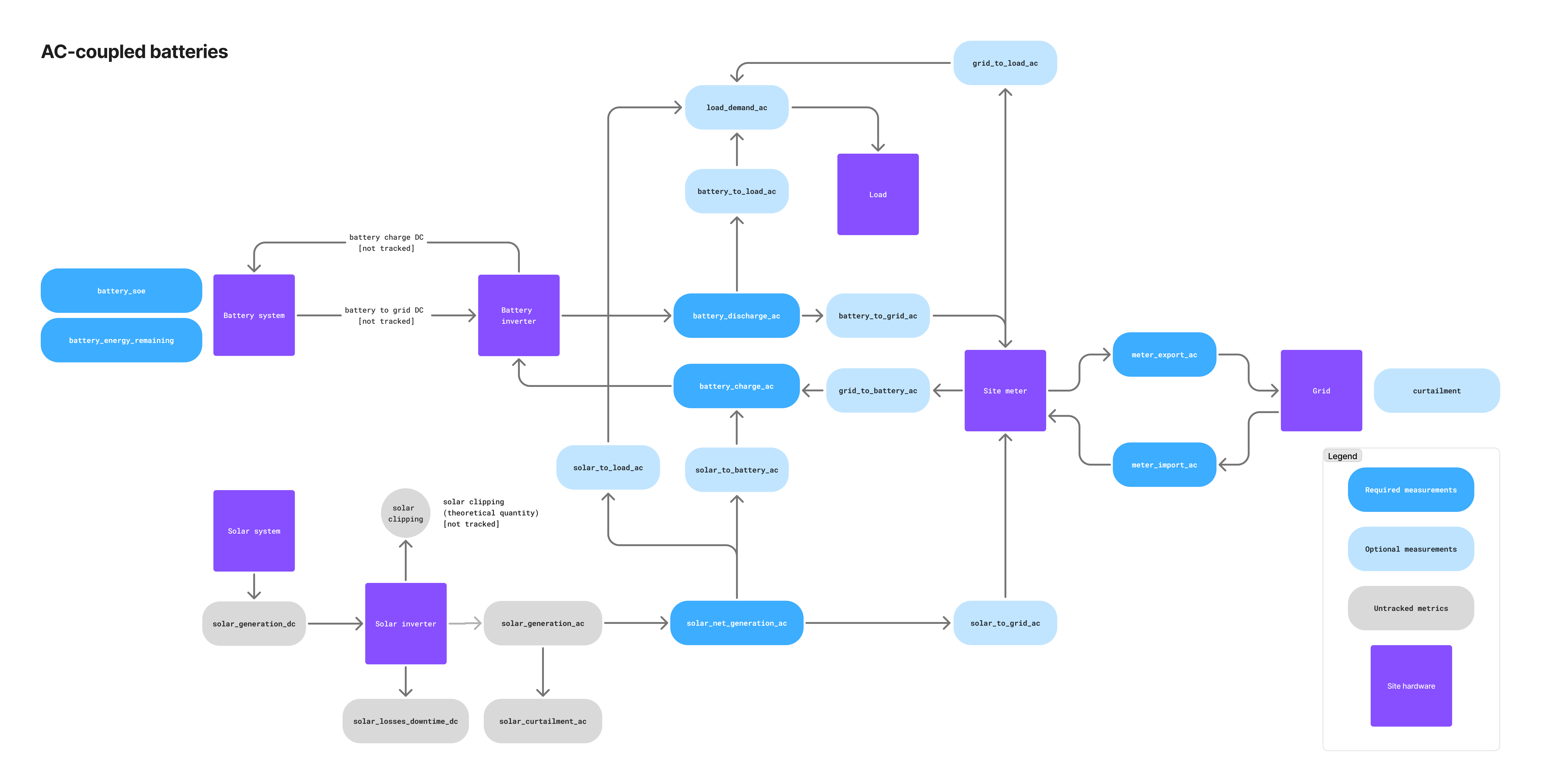
| Telemetry name | Required/Optional | Description |
|---|---|---|
solar_net_generation_ac | 🔴 Required | Solar generation after subtracting curtailment. Sum of solar_to_load_ac, solar_to_battery_ac, and solar_to_grid_ac. |
battery_charge_ac | 🔴 Required | Amount of energy charged into the battery system, usually measured at the battery meter or monitoring system. Sum of grid_to_battery_ac and solar_to_battery_ac. |
battery_discharge_ac | 🔴 Required | Amount of energy discharged from the battery system, usually measured at the battery meter or monitoring system. Sum of battery_to_grid_ac and battery_to_load_ac. |
solar_to_grid_ac | ⚪️ Optional | Amount of energy sent directly from the solar system to the site meter. |
solar_to_battery_ac | ⚪️ Optional | Amount of energy sent from the solar system to the battery. |
solar_to_load_ac | ⚪️ Optional | Amount of energy sent from the solar system to an on-site electrical load (e.g., factory). |
battery_to_grid_ac | ⚪️ Optional | Amount of energy sent from the battery to the grid measured at the main site meter. |
battery_to_load_ac | ⚪️ Optional | Amount of energy sent from the battery to an on-site electrical load (e.g., factory). |
grid_to_battery_ac | 🟡 Conditional | Amount of grid energy sent to the battery measured at the main site meter. Required if the battery system can charge from the grid. |
irradiation | 🔴 Required | On-site solar irradiation sensor reading in kW/m2. Used to improve solar generation forecasts and optimize battery charging. Published to dt/{siteId}/{gatewayId}/irradiation. |
DC-linked telemetry
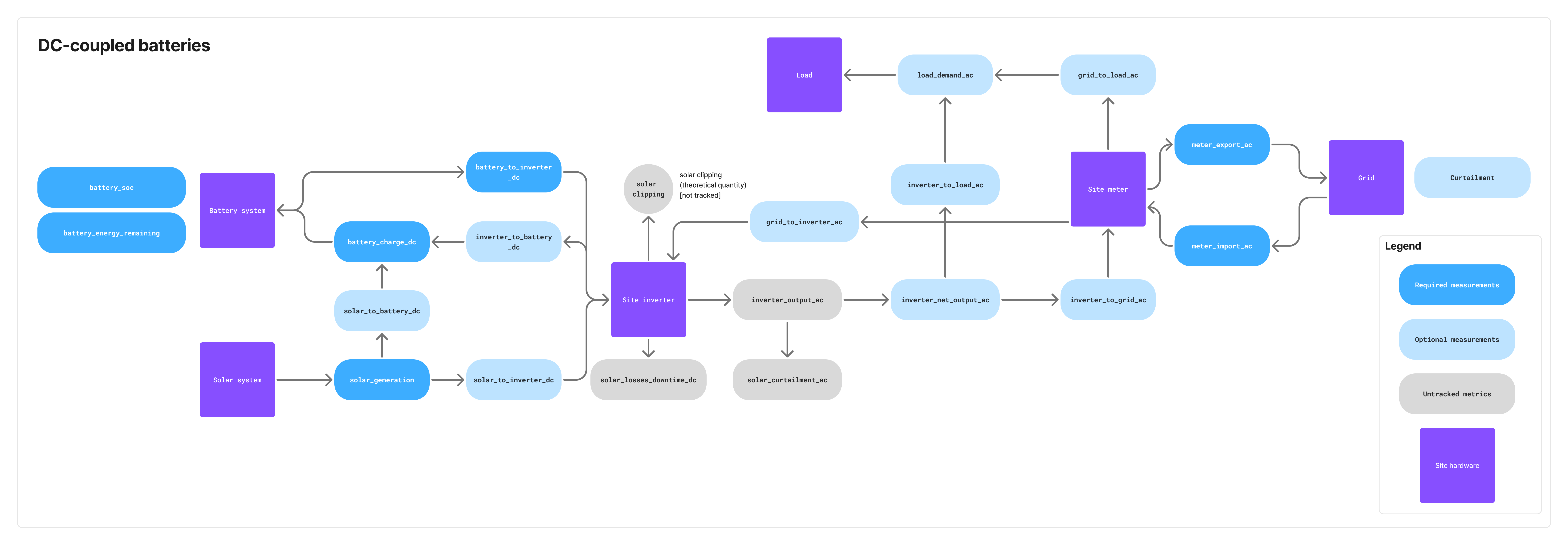
| Telemetry name | Required/Optional | Description |
|---|---|---|
solar_generation_dc | 🔴 Required | Amount of energy generated by the solar system measured on the DC side. Sum of solar_to_battery_dc and solar_to_inverter_dc. |
battery_charge_dc | 🔴 Required | Amount of energy charged into the battery system measured on the DC side. Sum of solar_to_battery_dc and inverter_to_battery_dc. |
battery_to_inverter_dc | 🔴 Required | Amount of energy sent from the battery to the site inverter. Measured on the DC side. |
inverter_net_output_ac | 🟡 Conditional | Total AC-side output of the site inverter. Sum of inverter_to_load_ac and inverter_to_grid_ac. Measured on the AC side. Required in case of an on-site electrical load. |
solar_to_battery_dc | ⚪️ Optional | Amount of energy sent from the solar system to the battery. Measured on the DC side. |
solar_to_inverter_dc | ⚪️ Optional | Amount of energy sent from the solar system to the site inverter. Measured on the DC side. |
inverter_to_battery_dc | ⚪️ Optional | Amount of energy sent from the inverter to the battery. Measured on the DC side. |
inverter_to_load_ac | 🟡 Conditional | Amount of energy sent from the inverter to an on-site electrical load (e.g., factory). Measured on the AC side. Required if on-site load exists. |
inverter_to_grid_ac | ⚪️ Optional | Amount of energy sent from the inverter to the grid. Measured on the AC side. |
grid_to_inverter_ac | 🟡 Conditional | Amount of grid energy sent to the inverter. Measured on the AC side. Required if the battery system can charge from the grid. |
irradiation | 🔴 Required | On-site solar irradiation sensor reading in kW/m2. Used to improve solar generation forecasts and optimize battery charging. Published to dt/{siteId}/{gatewayId}/irradiation. |
solar (DC voltage and current) | 🔴 Required | PV-array DC voltage (V) and current (A), measured at the DC link upstream of the inverter as a single value aggregated across the whole array. Voltage and current are sampled at the same instant and sent together as one matched pair on dt/{siteId}/{gatewayId}/solar (SolarDcElectrical message). DC-linked systems only. |
Solar DC voltage and current. For DC-linked systems where the PV array and battery share a DC bus, publish the PV array's DC voltage and current on dt/{siteId}/{gatewayId}/solar using the SolarDcElectrical message.
- What to send: one DC voltage reading in volts (
V) and one DC current reading in amperes (A), each a single aggregate value representing the whole PV array. Both values are ≥ 0. - Where to measure: on the DC side of the system, at the PV DC link upstream of the inverter (before DC-to-AC conversion). If the array has multiple strings or MPPT inputs, report the combined array total, not per-string values.
- How to measure: sample voltage and current at the same instant and send them together in one message so the pair is time-aligned, carried under
measurement_valueasvoltageandcurrent, each a{value, unit}object. Publish instantaneous readings at 1-minute resolution; do not send averaged or scheduled values. - When it applies: required only for DC-linked PV plus battery sites. AC-linked and stand-alone sites do not send this channel.
Stand-alone telemetry
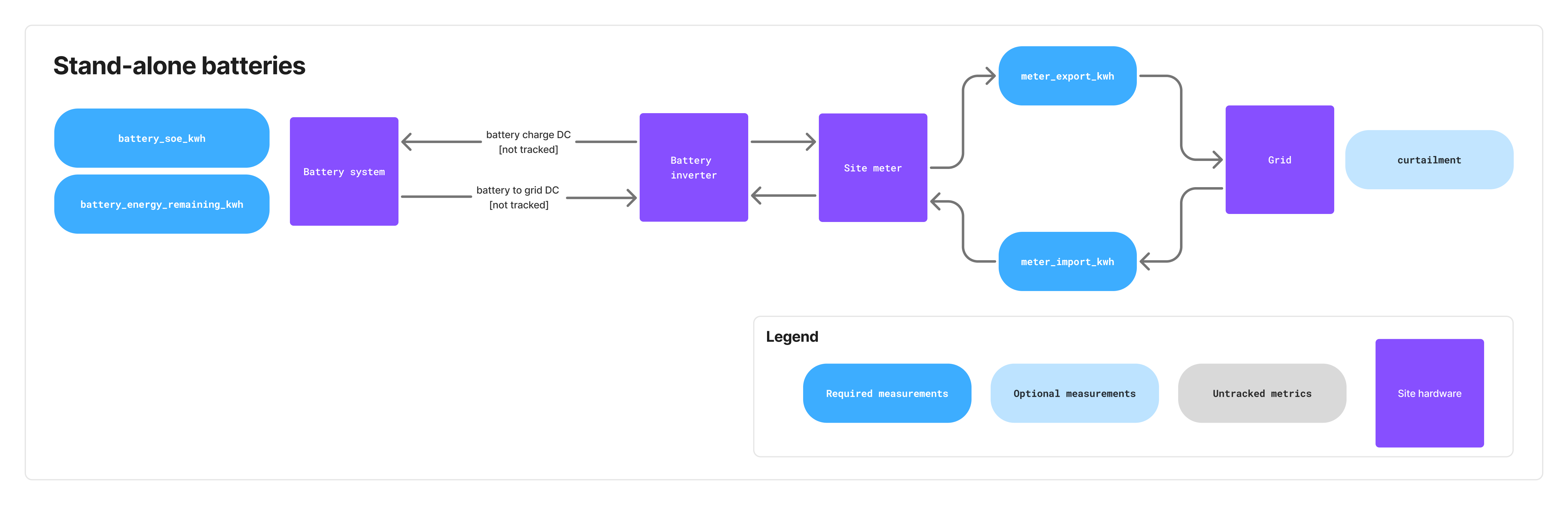 Stand-alone battery systems only require the telemetry listed in the "Common to all topologies" section above. Since there is no co-located solar generation, irradiation telemetry is not required. Curtailment telemetry is still required: a stand-alone battery can be subject to TSO output control even with no solar on site.
Publishing requirements and timing
Telemetry publishing requirements
| Message Type | Minimum Frequency | Recommended Frequency |
|---|---|---|
| Energy telemetry (windowed/lifetime) | Every 10 minutes | Every 1 minute |
| Instantaneous power (if available) | Same as energy or faster | Every 1 minute or faster |
Battery state (battery_soe) | Every 10 minutes | Every 1 minute |
Solar DC voltage & current (*/solar, DC-linked) | Every 1 minute | Every 1 minute |
battery_energy_remaining | Once per day | Once per day |
Alert snapshot (alertState) | Every 10 minutes | Every 5 minutes |
Alert events (alertEvent) | Immediately on state change | N/A |
| Curtailment schedules | On update from TSO | N/A |
FCR Assessment II 1-second power (*/power, FCR slots) | Every 1 second (FCR-awarded slots only) | Every 1 second |
FCR grid frequency (*/frequency, FCR slots) | Every 1 second (FCR-awarded slots only) | Every 1 second |
Key principles
- Different telemetry types should be published independently as they become available
- Alert events must be published immediately when hardware registers change state
- Alarm conditions or significant state changes should trigger immediate publishing
If the EMS does not regularly send required telemetry, Tensor Cloud will stop generating battery charge/discharge schedules.
Batched telemetry
Instantaneous power and grid frequency have an optional batched form that carries many readings in one message instead of one message per reading. It exists for the 1 Hz publishing that FCR Assessment II requires: at 1 Hz across two power metrics plus frequency, a site emits roughly 5,400 messages per 30-minute slot. No other telemetry channel has a batched form, and the single-message topics are unchanged.
dt/{siteId}/{gatewayId}/{metric}/power/batch
dt/{siteId}/{gatewayId}/frequency/batch
A batch states the fields that describe the whole series once, then lists the readings:
{
  "schema_version": "2.9.0",
  "message_id": "msg_a80dd197-47fa-44ca-8966-40d7b4d88277",
  "unit": "kW",
  "aggregation": "average",
  "aggregation_window": "PT1S",
  "measurements": [
    { "message_id": "msg_b91ee208-58fb-45db-9a77-51e8c5e99388",
      "measurement_ts": "2024-01-04T03:00:00.000+09:00", "value": 1480.5 },
    { "message_id": "msg_c02ff319-69ac-46ec-ab88-62f9d6faa499",
      "measurement_ts": "2024-01-04T03:00:01.000+09:00", "value": 1481.2 },
    { "message_id": "msg_d13aa420-7abd-4711-bc99-73fae7fbb500",
      "measurement_ts": "2024-01-04T03:00:03.000+09:00", "value": 1479.8 }
  ]
}
The second at 03:00:02 is absent because no reliable reading was available for it. This is the same missing-data rule that applies to single messages: skip the reading rather than publishing 0 or null.
Rules for a batch
- Split on any header change.
unit,aggregation,aggregation_windowandpre_qualificationapply to every reading in the batch, so start a new batch whenever one of them changes. This matters most forpre_qualification: a batch straddling the moment the operator enters or leaves test mode would misclassify half its readings. - Order strictly. Readings must be in ascending
measurement_tsorder, with no repeated timestamp and no repeatedmessage_id, and no reading'smessage_idmay equal the batch's own. - A batch is accepted in full or rejected in full. If any reading fails validation, none of the batch is stored, matching the all-or-nothing rule already used for command validation. Keep live batches small so that a rejection costs little.
- Every reading keeps its own
message_id, and that is what Tensor Cloud deduplicates on. The batch's ownmessage_ididentifies the publish attempt only, so you may re-group the same readings into differently-sized batches when resending, and you may retry a reading in the other form under its original id. - At most 900 readings, and at most 122,880 bytes in the encoded UTF-8 payload. Measure the payload after serializing and split before publishing: AWS IoT Core rejects any publish above 128 KB, and your client sees a dropped connection rather than an error response.
- QoS 1, and never RETAIN. See Quality of service.
Live versus backfill
Batching is enabled per site by Tensor Cloud, and it is backfill-only by default. Ask your technical contact which mode a site has before changing what the EMS publishes.
| Mode | Live readings | Backfill |
|---|---|---|
| Backfill-only (default) | single messages | batched |
| Backfill and live | batched, at most 60 seconds per batch | batched |
Backfill-only is the default because a batch delays delivery until it is complete. Low-voltage batteries in a VPP configuration must have their live telemetry arrive every second because Tensor Cloud dispatches against each reading as it arrives. A 60-second batch would therefore deliver state that is 60 seconds old. These sites publish live readings as single messages and use batches only for backfill.
The same topic carries data for two different 1 Hz requirements. FCR Assessment II requires 1 Hz measurement but does not restrict arrival time because submissions occur the month after delivery and may use backfilled data. VPP dispatch requires 1 Hz arrival. The site's control regime determines which requirement applies. A low-voltage VPP battery that also offers FCR must therefore send live readings as individual messages, although its Assessment II backfill may use batches.
Where live batching is enabled, the 60-second limit reduces the effect of an all-or-nothing rejection. One rejected 60-reading batch loses 60 seconds of a 30-minute slot, or 3.3% of its 1-second points. A rejected 15-minute live batch would lose half the slot. Backfill batches may contain all 900 readings because the EMS can correct and resend them from its local buffer.
Events and alerts
The EMS reports faults and status conditions through two channels:
dt/{siteId}/{gatewayId}/alert(alertEvent) → Delta updates when an alert changes state (statusbecomesactiveorcleared).dt/{siteId}/{gatewayId}/alert/active(alertState) → Periodic full snapshot of all currently active alerts.
Tensor Cloud uses both channels:
alertEventenables fast reaction to alert changes.alertStaterecovers lost events and reconstructs the full active state.
Flow of alert messages
- When a hardware register transitions
0 → 1, EMS publishes analertEventwithmeasurement_value.status = active. - On the next snapshot, EMS publishes an
alertStateincluding this active alert (EMS must publish alertState at least every 10 minutes or at system startup, whichever comes first). - When a register transitions
1 → 0, EMS publishes analertEventwithmeasurement_value.status = cleared. - While an alert remains active, EMS updates
last_seen_tsfor that alert in everyalertState.
Publish the snapshot on schedule even when no alert is active. In that case, send an alertState with an empty measurement_value array. Without the empty snapshot, Tensor Cloud cannot distinguish a healthy site from one whose EMS has stopped reporting.
Alert codes reference
| Code | Subsystem | Explanation |
|---|---|---|
BATT_SOC_LOW | Battery | Battery state of charge has fallen below 3%, risking insufficient energy availability for operations. |
BATT_SOH_DEGRADED | Battery | Battery state of health has fallen below 80%, indicating aging or damage that may require replacement planning. |
BATT_OVERTEMP | Battery | Battery temperature has exceeded safe operating limits, increasing the risk of accelerated degradation or thermal damage. The overtemperature threshold is usually defined by the battery OEM. |
BATT_COMM_FAIL | Battery | The EMS cannot communicate with the Battery Management System (BMS); the battery may still operate, but status and control are unavailable. |
BATT_OTHER | Battery | Any battery-related fault that does not fall into defined categories. |
PV_COMM_FAIL | Solar PV | The EMS cannot communicate with the inverter; the inverter may continue operating, but monitoring and control functions are unavailable. |
PV_OTHER | Solar PV | Any solar PV–related fault that does not fall into defined categories. |
CURT_COMM_FAIL | Grid/TSO | The EMS lost communication with the curtailment device, preventing TSO curtailment schedules from being acquired. |
GRID_OTHER | Grid/TSO | Any AC-side grid-related fault that does not fall into defined categories: loss of the grid connection, a protection relay or grid-interconnection breaker trip, an out-of-tolerance voltage or frequency condition at the connection point, or a site-wide power outage the EMS can still report. |
SETPOINT_UNREACHABLE | Battery | The EMS cannot deliver a commanded setpoint and is running clamped to the closest achievable value. Raised for an inverter or converter limit on a battery setpoint, and for a state-of-energy limit on a grid setpoint. Include the limit that was hit in the alert. Cleared once the EMS is tracking the commanded value again. |
UNKNOWN_FAULT | Unknown | Fault has been reported, but its type is not recognized or mapped to existing alert codes. Please contact the Tensor Energy technical team during the development phase to discuss including your alert code in this list. |
Faults that map to more than one code
One site fault may raise more than one alert code. Tensor Cloud treats them as separate conditions, not duplicates.
On a DC-linked system, the PV array and battery may share a hybrid inverter, power conditioning subsystem, or control or aggregation unit. A fault in shared hardware affects both subsystems and cannot be attributed to either one, so report both PV_OTHER and BATT_OTHER. A battery-only code tells Tensor Cloud that solar forecasting remains available, while a solar-only code indicates that the battery remains dispatchable.
For communication loss, an EMS that reaches the battery and PV through one collector may not have separate BMS and PVPCS status. If that collector stops responding, publish BATT_COMM_FAIL and PV_COMM_FAIL together. If the EMS has status for each device, report only the devices that are unreachable.
Clear each code on its own terms: when the shared fault resolves, publish a cleared alertEvent for every code it raised, and drop them all from the next snapshot.
Telemetry errors
If the EMS cannot send site telemetry to Tensor Cloud, for example because of a network issue, follow these guidelines:
- Retain telemetry locally for up to 7 days. Drop or summarize buffered data older than this.
- Replay order: live samples first. Only when no live sample is waiting to publish should the EMS resume sending backfilled history.
- Reuse the original
message_idwhen resending a sample. Tensor Cloud deduplicates onmessage_id, so the same telemetry reading must always carry the same ID across retries. - No late-window cutoff. Tensor Cloud works with the best available data: windowed and lifetime samples are accepted regardless of how long after the window closed they arrive.
- Log error details for analysis.
- Implement exponential backoff on reconnect to avoid overloading the broker (see Broker rate limits).
Broker rate limits
The MQTT broker is AWS IoT Core. The following AWS IoT Core message broker quotas are most relevant to an EMS:
- Up to 100 publish requests per second per connection (hard limit). Excess publishes are discarded, not queued.
- Up to 100 in-flight (unacknowledged) publishes per connection (hard limit).
- 512 KB/second throughput per connection (hard limit). Excess is delayed rather than discarded.
- 128 KB maximum message payload (hard limit), the same limit noted for curtailment schedules.
- A per-account publish rate of 20,000 messages/second (2,000 in some regions), adjustable via AWS support.
- Up to 8 subscriptions per SUBSCRIBE request, and a topic depth of at most 7 forward slashes (
/), with topic names at most 256 UTF-8 bytes. - One MQTT CONNECT per second per client ID.
Normal operation remains well below these limits. Even FCR Assessment II's 1 Hz publishing across several metrics and grid frequency produces only a few publishes per second per connection. Use exponential backoff on reconnect to stay within the CONNECT limit.
Backfill can approach the limits. The per-connection publish limit caps single-message recovery at 100 readings per second, so a multi-day gap can take hours to clear. With batched telemetry and roughly 40 readings per publish, the same connection can move about 2,000 readings per second. During recovery, send no more than 50 publishes per second and 256 KB per second, half of each quota. Network jitter can push traffic over a quota, and AWS discards publishes that exceed the rate limit. Live readings must also retain priority over backfill.
AWS meters MQTT messages in 5 KB increments and counts both the topic name and payload, so an 8 KB message is billed as two. Batching reduces metered volume by roughly 30x on 1 Hz streams. Do not tune batch sizes to fall just below a 5 KB boundary because the topic length changes that boundary.
Receive commands from Tensor Cloud
Command topics and flow
Tensor Cloud sends battery charge and discharge schedules and FCR offer schedules under the cmd/ prefix. The site ID and command type form these topics:
Battery power setpoint commands:
cmd/{siteId}/battery/power

Battery FCR offer commands:
cmd/{siteId}/battery/fcr
For a list of command types and their definitions, see the protocol schema.
Command lifecycle sequence
The acknowledgment (ack-cmd) must be sent immediately after receiving and parsing the command, not at execution time.
The EMS publishes the response to the res_topic value carried in the command payload. The AsyncAPI channel address (ack-cmd/{siteId}) is illustrative; the payload's res_topic is authoritative.
Battery power setpoint schedules
Throughout the protocol, power_kw (and the resulting battery power baseline) uses the sign convention positive = charging, negative = discharging, 0 = standby. The command topic cmd/{siteId}/battery/power is a single topic and does not encode direction, so the sign of power_kw is authoritative. Which point the value refers to is carried by reference_point on each interval: see Where the setpoint is measured.
Battery charge/discharge schedules are sent in two prioritized layers to cmd/{siteId}/battery/power:
- Every 30 minutes at minutes 15 and 45, a schedule covering the next 48 hours with one setpoint per 30 minutes is sent with priority 2
- Every Monday, Wednesday, and Friday at 6 am Japan time, a simplified long-term schedule covering 1 year with 3 setpoints per day is sent with priority 1
A higher priority number takes precedence; see Schedule interpretation rules for the full tie-breaking order.
Where the setpoint is measured
Each interval carries a reference_point naming the point its power_kw refers to. Never infer it from the site's topology. Tensor Cloud states it on every command, and it can differ between intervals of the same schedule.
reference_point | power_kw refers to | power_kw = 0 means |
|---|---|---|
battery (default when absent) | The battery itself | The battery stands by; co-located generation exports untouched |
grid | The site's metering point (受電点) | No net flow at the meter; the battery absorbs whatever is being generated |
battery is the ordinary case and covers arbitrage, SoE management, and balancing market setpoints relayed from the TSO. The EMS drives the battery to power_kw and lets generation pass through to the meter. -1000 kW means the battery discharges 1000 kW; if the array is producing 400 kW at the same time, 1400 kW leaves the site.
grid applies when the metering point itself is the objective, such as during an export-restriction window. 0 then holds the meter at zero. During 400 kW of generation, the battery meets that target by charging at 400 kW. The 受電点 is the point where meter_export_ac and meter_import_ac are measured. On a site with an on-site load, this differs from the inverter's AC output, and the EMS accounts for the load between them.
On DC-coupled systems, where the battery and PV share an inverter and the PCS accepts a net AC setpoint, the EMS honours battery by compensating that setpoint against measured PV. This local calculation uses live measurements. If Tensor Cloud calculated the setpoint instead, it would rely on a solar forecast made up to 48 hours earlier, and each forecast error would affect the battery setpoint.
Because omitting the field means battery, every command issued before 2.7.0 keeps exactly the meaning it had. Tensor Cloud sends grid only to sites whose EMS reports schema_version 2.7.0 or later, since an older EMS would ignore the field and silently apply battery semantics to a meter target.
The power setpoint schedule is also used to relay balancing market commands from Japan's TSO balancing command system (簡易指令システム) to each EMS. These commands are sent as they are received from the TSO by Tensor Cloud.
Battery FCR offer schedules & baseline composition
FCR (Frequency Containment Reserve) offer schedules are sent to cmd/{siteId}/battery/fcr and specify the capacity to offer for frequency regulation services. Each schedule item includes:
- Time window (start/end timestamps; FCR is dispatched in 30-minute slots, e.g. 6:00–6:30, 6:30–7:00)
- Capacity in kW to offer
FCR schedules are not sent at regular intervals and usually do not include fallback schedules. They are only sent when there are confirmed offers in the balancing market.
FCR baseline
In FCR mode, the regular power command sent to cmd/{siteId}/battery/power determines the baseline. For example, if the EMS receives a 1500 kW FCR schedule and a -100 kW charge or discharge command for the same slots, the baseline becomes -100 kW.
For virtual power plant (VPP) resources, where multiple batteries are aggregated into a single market resource, Tensor Cloud may need to redistribute capacity across the batteries while a slot is already in progress. The EMS may therefore receive an updated FCR capacity and/or power baseline for an FCR slot that has already started, and must apply it immediately, the same as any other in-progress interval. The EMS must support ad-hoc changes to both the power baseline (cmd/{siteId}/battery/power) and the FCR capacity (cmd/{siteId}/battery/fcr) during operation, not only at slot boundaries.
Cancelling FCR commands
FCR commands can be cancelled by sending a new command with action: "cancel" and specifying the time range to cancel. The cancellation:
- Respects priority rules: only cancels commands with equal or lower priority
- Can cancel arbitrary time periods (single 30-minute slots, multiple days, weeks, etc.)
capacity_kwmust be omitted (only the time range is needed); a cancel item that includescapacity_kwis rejected
Cancellation is used when market offers have been canceled (e.g., because required battery SoC levels cannot be reached). Offers can be canceled up to 1 hour before delivery (gate closure).
Schedule interpretation rules
Apply these rules to all power setpoint and FCR command schedules:
- Priority wins. Execute higher priority over lower priority schedules.
- Same-priority tie-break by
issue_ts. If schedules covering the same time period have the same priority, execute the one with the most recentissue_tstimestamp. - Full tie → last-wire wins. If
priorityandissue_tsare both identical, the most recently received command (last over the wire) wins. - Per-slot resolution. A new command replaces an existing schedule only for the time slots it actually covers; existing intervals outside the new command's range remain in effect.
- Gaps within a command. Where a single command's schedule leaves a gap between intervals, the EMS falls back to any previously valid command covering that time slot. If no previous command applies, the EMS uses
power_kw = 0(standby). - No power-command cancellation. There is no
action: "cancel"onBatteryPowerCommand. To "cancel" or override an in-flight power schedule, Tensor Cloud sends a new command with appropriate priority and apower_kw = 0(or other replacement) schedule covering the affected slots. FCR commands use the explicitaction: "cancel"mechanism described above. - Execute in-progress intervals immediately. Tensor Cloud may issue a command after the slot it covers has already started, even mid-slot. If an interval's
start_tsis in the past and itsend_tsis in the future, that interval is currently active: the EMS must apply its setpoint immediately rather than waiting for a future start time. (Only a schedule whose finalend_tsis also in the past is stale and rejected; see the validation rules below.) - No schedule at all → stop. If no command covers the current time and no previously valid command applies to it, the EMS stops the battery: it holds
power_kw = 0(standby) and neither charges nor discharges until a command covering the current time arrives. - Unreachable setpoints are clamped, not rejected. If the EMS cannot deliver an interval's value (an inverter limit on a
batterysetpoint, a state-of-energy limit on agridsetpoint), it applies the closest physically achievable value, keeps executing, and raises aSETPOINT_UNREACHABLEalert naming the limit it hit. It does not stop the battery and does not reject the command: this surfaces at execution time, and the acknowledgement covers receipt-time validation only.
Every command includes issue_ts, an ISO-8601 timestamp recording when Tensor Cloud issued it. The EMS uses this timestamp to choose between commands of the same priority that cover the same period.
Command validation rules
The EMS must reject the following commands with an ack-cmd error response:
- Empty schedule:
control.scheduleis an empty array. - Overlapping intervals within a single command: two or more intervals in the same
control.scheduleoverlap in time. - Stale schedule: the
end_tsof the last interval incontrol.scheduleis in the past. (Theissue_tsitself is only used for tie-breaking and is not a freshness check.) - Inverted or empty interval: an interval whose
start_tsis greater than or equal to itsend_ts. Report asTIME_WINDOW_INVALID. - Out-of-range value: a
power_kworcapacity_kwoutside what the battery can deliver. Report asFIELD_OUT_OF_RANGE. capacity_kwon the wrong action: present on an FCR item withaction: "cancel", or absent on one withaction: "execute".
Validation is all-or-nothing
A command is accepted whole or rejected whole. If any item in control.schedule fails validation, the EMS applies none of the items in that command, including the ones that were valid, and continues executing the previously valid schedule. This holds for both cmd/{siteId}/battery/power and cmd/{siteId}/battery/fcr, and for FCR commands with action: "cancel" as well as action: "execute": a cancel carrying one bad interval cancels nothing.
Applying the valid part of a mixed command would leave the battery in a state neither side has recorded. status is ok or error with nothing in between, so a partially applied command is acknowledged as an outright failure and Tensor Cloud has no way to learn which slots survived. The slots that were dropped do not become gaps either: under the per-slot resolution and gap rules above they fall back to whatever older command last covered them, silently reviving a schedule that was meant to be replaced. For an FCR offer the consequence reaches the market, since capacity would stay committed to the TSO with no dispatch behind it.
When rejecting, report every failure rather than stopping at the first: emit one entry in errors[] per invalid item, each with its own field_path (control.schedule[2].power_kw), so the command can be corrected in a single round trip. Tensor Cloud recovers by issuing a corrected command; there is nothing the EMS needs to roll back, because nothing was applied.
Command execution priority logic
Command errors
If the EMS receives a command that it cannot process (e.g., due to malformed JSON or unsupported parameters), it should:
- Respond on the command's
res_topic(typicallyack-cmd/{siteId}) with an appropriate error message - Continue executing the previous valid schedule until the error is resolved in order of priority and time
- Discard the rejected command in full, including any schedule items that were themselves valid (see Validation is all-or-nothing)
When the command cannot be parsed at all (MESSAGE_MALFORMED), its message_id cannot be recovered to populate the response's required command_id. In that case, set command_id to the sentinel string "unknown". If the message_id is partially recoverable, echo the recovered value instead. The response's own message_id is always a fresh, EMS-generated id and is unaffected.
If the EMS does not receive any command schedule (e.g., due to communication issues), it should continue executing the previous valid schedule. No ack-cmd response is sent in this case; Tensor Cloud detects missing commands from its own side.
FCR Assessment II reporting
When a battery participates in the primary control reserve market (FCR, 一次調整力) as an offline-monitored resource, the TSO does not receive a live telemetry feed. Instead it assesses the delivered response after the fact (Assessment II) from 1-second-resolution supplied-power data. The data is submitted on the TSO's official Excel template for offline FCR Assessment II (Form 35).
Tensor Cloud completes the template and submits it to the area TSO on behalf of the aggregator (the market participant). The deadline is the next business day after the TSO issues its request in the month following the delivery period. Tensor Cloud therefore needs 1 Hz power telemetry from your EMS for every FCR-awarded slot.
This requirement is specific to FCR participation and is in addition to the energy telemetry required for optimization. It does not apply to sites that do not offer FCR.
What to publish (FCR 1 Hz data)
Publish one sample per second (1 Hz) on the existing instantaneous-power topic, dt/{siteId}/{gatewayId}/{metric}/power, in kW and ≥ 0 (direction is encoded in the metric name, exactly as for all other power telemetry). Each sample must cover exactly one whole second, aligned to whole-second boundaries; it must not bleed into the previous or next second. Each value should be the 1-second average for that second: set aggregation: "average" and aggregation_window: "PT1S" on the payload, and set measurement_ts to the start of that second (the averaging window is [measurement_ts, measurement_ts + 1s), following the protocol's left-inclusive [start_ts, end_ts) convention). If your meter provides only instantaneous readings, sample at 1 Hz and leave the default aggregation: "instant"; Tensor Cloud then treats each 1 Hz sample as that second's value.
Keep every EMS gateway's clock synchronized across your entire fleet (e.g. via NTP) and ensure measurement_ts is accurate and in JST. Assessment II pairs each 1-second sample with the frequency of that same second, correcting only for the fixed delay time, so even a small timestamp drift pairs otherwise-correct power with the wrong frequency and distorts the assessment of the slot.
Publish the metrics that match how the resource is registered with the TSO:
| Registration | Measurement point | Metrics to publish (1 Hz) | Net measured power derived by Tensor Cloud |
|---|---|---|---|
| Grid-connection-point | Net power at the site's grid-connection point | meter_export_ac/power and meter_import_ac/power | meter_export_ac − meter_import_ac |
| Equipment-point | Net power at the battery equipment | battery_discharge_ac/power and battery_charge_ac/power | battery_discharge_ac − battery_charge_ac |
Which registration applies is fixed by the resource's TSO registration, not chosen by the EMS. If you are unsure which metric set to publish, confirm it with your Tensor technical contact before go-live. If both meter sets are available you may publish both; Tensor Cloud uses the set matching the registration. These are AC-side measurements; for DC-linked systems, contact your Tensor technical representative.
You publish raw measured AC power only. Tensor Cloud derives the net measured power, converts it to the sending-end basis (including network-loss correction), subtracts the registered baseline (the generation plan or reference baseline) to obtain the supplied power, and formats it for the template.
Grid frequency
Alongside the 1 Hz power, publish grid frequency at 1 Hz for every FCR-awarded slot on the dt/{siteId}/{gatewayId}/frequency topic (the GridFrequency message), in Hz. Measure it at the grid connection point from the live AC voltage waveform (never a nominal, scheduled, or otherwise derived value) and report it to at least 0.01 Hz resolution. Use the same 1-second-average convention as the power samples: set aggregation: "average", aggregation_window: "PT1S", and measurement_ts to the start of the second, so each frequency sample lines up with the power sample for the same second. Tensor Cloud uses the frequency series together with the supplied power to reconstruct the delivered FCR response for Assessment II.
Which slots, and when
Each month the TSO randomly selects up to 8 of the resource's FCR-awarded slots for normal-operation assessment (or all of them if fewer than 8 were awarded that month), plus any system-event slots (for example, a generation-loss frequency event). Only those selected slots are submitted on Form 35; the remaining awarded slots are never submitted.
The TSO announces its selection after the delivery month, so the selected slots are not known in advance. Publish 1 Hz data for every FCR-awarded slot, meaning every 30-minute slot with an FCR offer command on cmd/{siteId}/battery/fcr (see FCR offer schedules). Tensor Cloud retains the data and submits only the slots selected by the TSO. Slots without an FCR schedule do not need 1-second data.
Normal-operation assessment fits an approximation line (近似線) through the slot's 1-second points and judges the resource on the direction of that line's slope: power rising as frequency falls, and falling as it rises. There is no tolerance band and no per-point pass rate, so there is no share of the slot's points that may be dropped without consequence: every missing or inaccurate sample pulls the fitted line. Apply the missing-data rules: skip a sample you cannot read rather than publishing 0 or null. Backfilling is acceptable within the local retention window (60 days for FCR data; see Connection loss and resend); live samples take priority.
Assessment II is submitted in the month after delivery, so its 1 Hz requirement applies to the measurement interval rather than arrival time. Batched telemetry is therefore suitable, particularly for resending a backlog. A site may still need to deliver live readings within one second for requirements unrelated to Assessment II; see Live versus backfill.
Connection loss and resend
If the connection to the broker drops, buffer the 1-second samples locally and resend them once connectivity is restored; do not discard them. Each missing second is one fewer point the approximation line is fitted through, and the slot it belongs to may be one the TSO later selects. Follow the telemetry error-handling rules: reuse each sample's original message_id on resend so Tensor Cloud can deduplicate, and send live samples first before backfilling the gap.
Retain the 1-second data for FCR-awarded slots locally for 60 days, longer than the 7-day window that applies to general telemetry. Assessment II requests arrive in the month following delivery, so a 60-day local copy lets the data be re-supplied if it has not yet reached Tensor Cloud, or if a slot is queried late. Once data reaches Tensor Cloud it is retained there as well.
Pre-qualification testing (事前審査)
Before a resource may participate in the FCR market it must pass a pre-qualification test (事前審査). During the test the EMS operator switches the site into a test mode and drives the battery against a simulated frequency signal injected into the resource's control system, rather than the live grid frequency. The signal may be produced by a hardware source or generated in software on the EMS; either way the EMS measures and publishes the injected value. This mode is activated by the EMS operator, not by Tensor Cloud, and it can run outside any FCR-awarded slot.
FCR pre-qualification describes the test, injected frequency patterns, and response criteria. It also provides mock frequency profiles for the person performing the injection and lists the specifications and controller settings that telemetry cannot demonstrate. This section covers only the data that the EMS publishes during a test.
While the site is in this mode, set the optional pre_qualification: true flag on every instantaneous-power (*/power) and grid-frequency (*/frequency) message the EMS publishes. Publish the telemetry exactly as you would during a real FCR-awarded slot: same topics, same 1 Hz cadence, same fields; the flag is the only difference. Tensor Cloud uses pre_qualification to identify the test window and exclude it from battery optimization and from FCR Assessment II submissions. Omit the flag (or set it to false) as soon as the operator leaves the test mode.
An instantaneous-power sample published during pre-qualification, on dt/{siteId}/{gatewayId}/meter_export_ac/power:
{
  "schema_version": "2.9.0",
  "message_id": "msg_b91ee208-58fb-45db-9a77-51e8c5e99388",
  "measurement_ts": "2024-01-04T03:00:00.000+09:00",
  "pre_qualification": true,
  "measurement_value": {
    "value": 1480.5,
    "unit": "kW",
    "aggregation": "average",
    "aggregation_window": "PT1S"
  }
}
The matching grid-frequency sample for the same second, on dt/{siteId}/{gatewayId}/frequency, here carrying the simulated frequency the EMS drives the battery against:
{
  "schema_version": "2.9.0",
  "message_id": "msg_c02ff319-69ac-46ec-ab88-62f9d6faa499",
  "measurement_ts": "2024-01-04T03:00:00.000+09:00",
  "pre_qualification": true,
  "measurement_value": {
    "value": 49.812,
    "unit": "Hz",
    "aggregation": "average",
    "aggregation_window": "PT1S"
  }
}
Validate and go live
Implementation process
1. Initial reach out
To integrate with Tensor Cloud's battery optimization service, contact us to schedule an initial meeting. Complex integrations may require more than one planning meeting.
We recommend including Tensor Energy and the battery system owner in early discussions about operational and economic requirements and any constraints that may affect the integration.
2. Certificate setup
After the initial meeting, our technical team provides development X.509 certificates for the staging MQTT broker.
3. Integration phase
Depending on the maturity and flexibility of your EMS, integration may take from a few days to several months. Our technical team can help establish the initial MQTT connection and answer questions about the protocol.
If Tensor Cloud requires customization, our team will coordinate the work with your development timeline.
Testing and validation
Tensor Cloud provides a separate environment for integration testing. It differs from production in these ways:
- Complete isolation in terms of data and operations between both environments
- In testing, Tensor Cloud will respond to all telemetry messages from EMS devices with an explicit
error/okresponse in topicack-dt/{siteId}/{gatewayId} - Telemetry that cannot be parsed is acknowledged too. Because its
message_idcannot be recovered, the feedback carriescorrelation_id: "unknown",code: "MESSAGE_MALFORMED", and atopicfield naming the channel the message was published on. Do not assumecorrelation_idalways matches themsg_UUID pattern
Once the initial integration is complete, we will coordinate integration testing with you. Testing includes:
- Validating telemetry data publishing
- Testing command processing and response
- Ensuring proper error handling and recovery mechanisms
Contact your technical representative at Tensor Energy for details on the testing process.
Before commands can reach you
Telemetry starts flowing the moment your certificate connects, but commands do not. Tensor Cloud publishes to cmd/{siteId}/battery/power and cmd/{siteId}/battery/fcr only when two conditions hold: the battery exists as an asset in a Tensor Cloud workspace and is associated with your EMS gateway, and that gateway is publishing telemetry. Until both are true, your subscription is connected but silent.
Registering the asset and creating the association is work on the Tensor Energy side, not something you can do from the EMS. Ask your technical representative to set it up and confirm the association before you schedule command testing.
Sending telemetry is on your side. Tensor Cloud only dispatches commands to a gateway it sees reporting, and this applies to the EMS you test with as much as to a production device: a virtual or simulated EMS that subscribes to the command topics but publishes nothing never receives a command. Bring telemetry up first, confirm it is acknowledged on ack-dt/{siteId}/{gatewayId}, and only then expect commands. Once both conditions are met, the optimizer schedules the battery the same way it does in production and normal command traffic begins.
Every checklist item that depends on receiving a command is blocked until then, including the response and acknowledgement items in the Arbitrage and FCR modules.
Testing error paths with a mocked broker
Tensor Cloud only ever emits valid commands, so the error paths of your command handling cannot be exercised against the test server. Your gateway certificate is not authorized to publish on cmd/... either, so you cannot inject them over the real broker yourself.
We recommend covering these paths with unit and integration tests against a mocked MQTT broker in your CI. Run an in-process or containerized broker, publish crafted BatteryPowerCommand and BatteryFcrCommand payloads to cmd/{siteId}/battery/power and cmd/{siteId}/battery/fcr, and assert on the CommandResponse that your EMS publishes to ack-cmd/{siteId}. Inject at the MQTT boundary so the test includes the subscriber and deserialization path. The test should verify that the subscriber handles invalid JSON without crashing.
At minimum, cover: malformed (non-JSON) payloads, missing and wrong-typed required fields, out-of-range numeric values, empty and overlapping schedules, schedules whose final end_ts is already in the past, capacity_kw present on action: "cancel" or absent on action: "execute", and a schedule mixing valid and invalid items, which must leave the battery on its previous schedule with no item from that command applied.
The integrator checklist marks which items this applies to in its Verification column.
Reference
Error codes
The protocol uses standardized error codes across all error surfaces:
MESSAGE_MALFORMED: Message is not valid JSON. Because the originatingmessage_idcannot be recovered, the acknowledgement's correlation field is set to the sentinel"unknown":command_idonCommandResponse,correlation_idonTelemetryFeedback. ATelemetryFeedbackcarrying this sentinel also setstopic, since that is then the only way to identify the rejected message.MISSING_FIELD: Required field is missingTYPE_MISMATCH: Field has incorrect typeFIELD_OUT_OF_RANGE: Numeric value outside valid rangeTIME_WINDOW_INVALID: Invalid time window or schedule. Use forstart_ts >= end_tsin any interval, overlapping intervals within one command, and emptyschedulearrays. It also covers acurtailmentinterval that is not an aligned 30-minute slot: either timestamp off minute00or30in JST, non-zero seconds, or a span other than exactly 30 minutes.DUPLICATE: An identifier reused for different content, or repeated within a single batch. Resending a reading unchanged under its originalmessage_idis the documented recovery behaviour and is an idempotent success, not a duplicate.EXPIRED: Schedule's last intervalend_tsis in the past at the time of validation.RESOURCE_UNAVAILABLE: Required resource is unavailable (e.g., connection between EMS and battery system is severed)INTERNAL_ERROR: Internal system error not covered by other error types. This also covers a well-formed command that fails during receipt-time handling and cannot be accepted/committed before the ACK is sent (e.g. an internal failure committing a requested schedule change, such as clearing a previously stored schedule). The ACK reflects receipt-time validation and acceptance, not later execution; a failure that surfaces only at execution time is reported through alerts/telemetry, not this ACK. UseINTERNAL_ERRORwith adetaildescribing what could not be accepted.
Error surfaces
- CommandResponse.errors[]: Machine-actionable command validation results. Each error carries
code(fromErrorCode),detail, and an optionalfield_pathpointing at the offending field (e.g.control.schedule). - TelemetryFeedback.code: Validation error codes (staging only). Error feedback also carries
detail, an optionalfield_path, and an optionaltopicnaming the channel the offending telemetry arrived on. Whencorrelation_idis"unknown",topicis the only identifier available; pair it with the time the feedback arrived to locate the offending publish.
Resources
- AsyncAPI schema file: Download JSON
- Protocol specifications: Online documentation
- FCR pre-qualification mock frequency: Download XLSX